
Documentation Index

Fetch the complete documentation index at: https://docs.fenixstudios.net/llms.txt

Use this file to discover all available pages before exploring further.

Fenixpng
Installation guide and dependencies for FNX Advanced IDS.

πŸ“¦ Dependencies


Before installing FNX Advanced IDS, make sure your server has the following resources installed and working correctly.
  1. Community Bridge
    This resource is mandatory, It is used to handle framework compatibility (ESX, QBCore, Qbox), inventory systems and UI / menu / notify / target systems
  2. screenshot-basic or screencapture
    This resource is used to take player photos and generate document images You also need a MySQL resource:
  • Recommended: oxmysql
  • Supported: mysql-async
⚠️ Important Notes
  • Make sure community_bridge starts BEFORE fnx-advancedids
  • Make sure screenshot-basic or screencapture is working correctly, otherwise photos will not work

πŸ“¦ Supported Frameworks and Inventory Systems

Inventories and frameworks are auto detected and they don’t need a manual configuration. Frameworks:
  • ESX
  • QBCORE
  • QBOX
Inventories:
  • ox_inventory
  • qb-inventory
  • qs-inventory
  • core_inventory
  • codem-inventory
  • origen_inventory
  • ps-inventory
  • jpr-inventory
  • tgiann-inventory
⚠️ Note All supported inventories are compatible, however metadata handling may vary depending on the inventory version and configuration.

Items

	['fnx_card'] = {
		label = 'Fenix Card',
		stack = false,
		close = true,
	},

βš™οΈ Configuration

This guide will show you exactly where and how to configure the script, step by step. You do NOT need any coding experience to follow this.

πŸ“ Step 0 β€” FIVEMANGE IMAGE UPLOADER CONFIGURATION
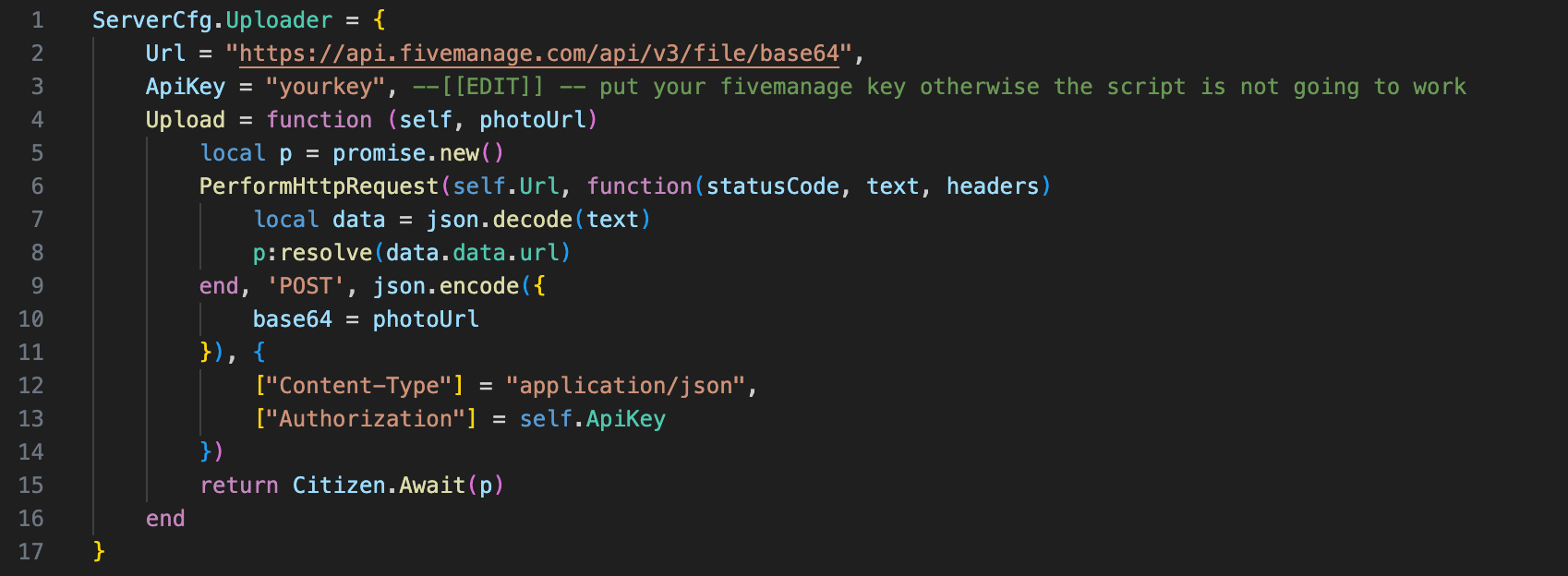
settings/public/server/cfg.lua
Image

πŸ“ Step 1 β€” Open the Configuration File

All main configuration is done inside this file
settings/public/client/cfg.lua

Step 2 - Create a custom card

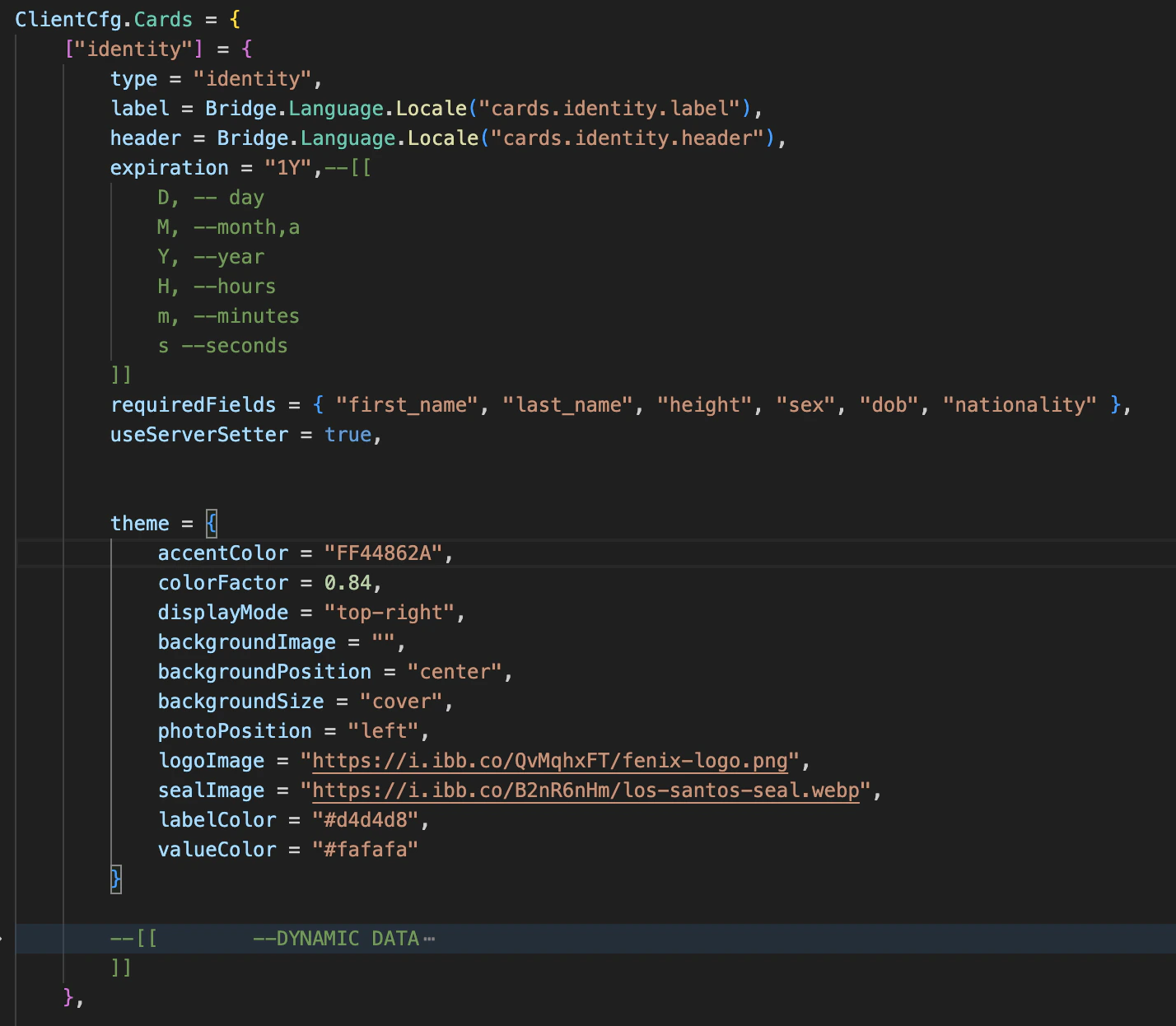
Inside cfg.lua, scroll to
ClientCfg.Cards = { .. }
that’s the default id card configuration
Image
to create a custom card, like a MEDICARE card, follow this example
["medicare"] = {
    type = "medicare", 
    label = "Medicare Card",
    header = "LOS SANTOS MEDICARE",
    expiration = "1Y",--[[
        D, -- day
        M, --month
        Y, --year
        H, --hours
        m, --minutes
        s --seconds
    ]]
    requiredFields = { "first_name", "last_name", "height", "sex", "dob", "nationality" },
    useServerSetter = false,

    theme = {
        accentColor = "FF2A8C82",
        colorFactor = 0.84,
        displayMode = "top-right",
        backgroundImage = "",
        backgroundPosition = "center",
        backgroundSize = "cover",
        photoPosition = "left",
        logoImage = "https://i.ibb.co/QvMqhxFT/fenix-logo.png",
        sealImage = "https://i.ibb.co/B2nR6nHm/los-santos-seal.webp",
        labelColor = "#d4d4d8",
        valueColor = "#fafafa"
    }

    --[[        --DYNAMIC DATA
        fields = { 
            {
                key = "", --?
                label = "",
                value = ""
            }
        },
        created_at = 1735689600,
        expires_at = 1767225600,
        id = -1,
        image_url = "https://dummyimage.com/512x512/1f2937/f9fafb.png&text=MARIO+ROSSI", 
    ]]
},
the index, is the card name
["medicare"] = 
type is supposed to be the same as the index
type = "medicare", 
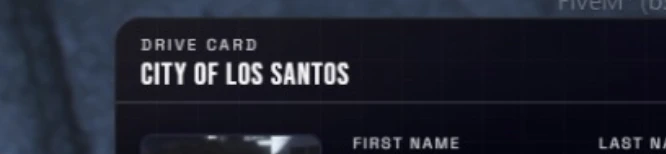
The label and header fields are the ones displayed on top-left of the card, see the picture as reference
label = "Drive card",
header = "City of los santos",
Image
This requiredFields contains the fields that you want to show up on the card, you can also create custom fields and much more, each card can be unique in the use.
requiredFields = { "first_name", "last_name", "height", "sex", "dob", "nationality" },
This option, set the as a license the item name on the player data.
useServerSetter = false,
** no more is explained because is mainly styling job. we hape you enjoyed your custom card creation.

πŸ“ Step 3 - Points configuration

Inside cfg.lua, find:
ClientCfg.Points = { ... }
These are the locations where players can obtain documents, you can add new points, remove or change them.
takeDataFromUserInput = false,
This config, allow the player to set manually the data displayed on the type of license that’s going to obtain, this feature is active on the fake id point, be default for driving licenses, id card and firearm license is set on false, because we get the data automatically.
type = "drive",
it’s the card previously created that’s going to be given trought this point.
price = {
    money = 500,
    bank = 500
}
in any point you can also change price, remove it bank / cash or other accounts like black_money
requiredItems = {
	["water"] = 10,
},
in any point, you can set one or more required items to obtain a card, this can be useful for the fake id creation point, it works in this way
requiredServerLicense = {
	["drive"] = true,
},
in any point, you can set that to get a determinate item you need to have another license saved on your framework, for example, on the sample config above, to get the access to this license (we will say thats the flight permit) you need to mandatory have the β€œdrive” license saved on your core (for example, in esx_license ) that’s the car driving license.
allowDuplicate = true, 
it means that on this point, the card can be taken as many times the players wants to

Exports Integrations

1. GiveId

This export gives a card directly to a player, It does not use a world point or NPC.
It is useful when another script already knows exactly which card should be given.
exports["fnx-advancedids"]:GiveId(target, cardType, cardData)

target

The player’s server ID. example target = source

cardData

A table containing the data used to create the card.
{
	price = { -- price to set when giving a card 
   		["money"] = 500,
		--["cash"] = 100,
		--["black_money"] = 312,
		["bank"] = 500,
		--["dirty_money"] = 15000
	},-- or nil
    fields = {
        {
            label = "Label", -- example "FIRST NAME"
            value = "Value", -- example "Jonh"
            side = "front" -- front or back 
        },
    },
    url = "image url" -- The image URL used for the player's photo.
}

cardType

The card type to create, this must match a card defined inside:
settings/public/client/cfg.lua
inside:
ClientCfg.Cards = {
Example valid values:
  • "identity"
  • "weapon"
  • "drive"
  • "driver"

Example:

exports["fnx-advancedids"]:GiveId(source, "identity", {
	price = {
		["money"] = 500,
		--["cash"] = 100,
		--["black_money"] = 312,
		["bank"] = 500,
		--["dirty_money"] = 15000
	},-- or nil
    fields = {
        {
            label = "First Name",
            value = "John",
            side = "front"
        },
        {
            label = "Last Name",
            value = "Smith",
            side = "front"
        },
        {
            label = "DOB",
            value = "01/01/2000",
            side = "front"
        }
    },
    url = "https://your-image-url.com/image.png"
})

2. OpenCardCreation

This export opens the normal FNX Advanced IDS card creation flow for a player. This means the player will:
  • open the card creation flow
  • use the internal photo system
  • complete the normal document generation process
This is the best option when you want to reuse the script’s built-in creation system.
exports["fnx-advancedids"]:OpenCardCreation(target, cardType, cfg)

target

The player’s server ID.

cardType

The card type to create. This must match a card defined inside:
settings/public/client/cfg.lua
inside:
ClientCfg.Cards = { .. }
Example:
  • "identity"
  • "weapon"
  • "drive"
  • "driver"

cfg

A table with creation options.

Structure

{
    price = { ... },
    takeDataFromUserInput = false
}

cfg.price

The price used for the creation flow. Example:
	price = {
   		["money"] = 500,
		--["cash"] = 100,
		--["black_money"] = 312,
		["bank"] = 500,
		--["dirty_money"] = 15000
	 },-- or nil
Use nil if the document should be free.

cfg.takeDataFromUserInput

Controls whether the player must manually enter the document data.

Example values

takeDataFromUserInput = false
  • player data is taken automatically
takeDataFromUserInput = true
  • player must manually enter the field values
This is especially useful for:
  • fake IDs
  • criminal documents
  • custom roleplay identities

⚠️ Important

OpenCardCreation uses the FNX Advanced IDS internal camera system. That means the player will go through the full photo capture flow before receiving the card.

Example: Driving School Integration

Below is an example integration with a driving school script. After the player receives the license through the driving school system, the script opens FNX Advanced IDS card creation to generate the physical card.
RegisterNetEvent('esx_dmvschool:addLicense')
AddEventHandler('esx_dmvschool:addLicense', function(type)
    local _source = source

    TriggerEvent('esx_license:addLicense', _source, type, function()
        TriggerEvent('esx_license:getLicenses', _source, function(licenses)
            TriggerClientEvent('esx_dmvschool:loadLicenses', _source, licenses)
        end)
    end)

    exports["fnx-advancedids"]:OpenCardCreation(_source, "drive", {
        price = nil,
        takeDataFromUserInput = false,
    })
end)

Example: Illegal Menu / Fake ID

Below is an example where a criminal menu gives access to a fake identity document.
RegisterNetEvent('illegalMenu:giveFakeId')
AddEventHandler('illegalMenu:giveFakeId', function(target)
    exports["fnx-advancedids"]:OpenCardCreation(target, "identity", {
        price = nil,
        takeDataFromUserInput = true,
    })
end)
In this case:
  • the card type is still identity
  • the player enters the data manually
  • this allows fake identity creation

Common Mistakes

Wrong cardType

If the card type does not exist in:
ClientCfg.Cards
the export will not work correctly. Always use a valid card type.

Missing fields in GiveId

If you use GiveId, make sure the fields table contains the values you want to show on the card. This export does not automatically build the field list for you unless your internal implementation does it.

Missing image URL in GiveId

If you use GiveId, always make sure url is valid if your card requires a photo.

Using OpenCardCreation without understanding camera flow

OpenCardCreation is not an instant give function. It opens the normal creation process, including photo capture.

Best Practice

  • Use GiveId for direct scripted delivery
  • Use OpenCardCreation for immersive player-facing flows\

Quick Reference

Give a card directly

exports["fnx-advancedids"]:GiveId(target, cardType, cardData)

Open normal creation flow

exports["fnx-advancedids"]:OpenCardCreation(target, cardType, cfg)