> ## Documentation Index
> Fetch the complete documentation index at: https://docs.fenixstudios.net/llms.txt
> Use this file to discover all available pages before exploring further.
# FNX EASY ROBBERIES
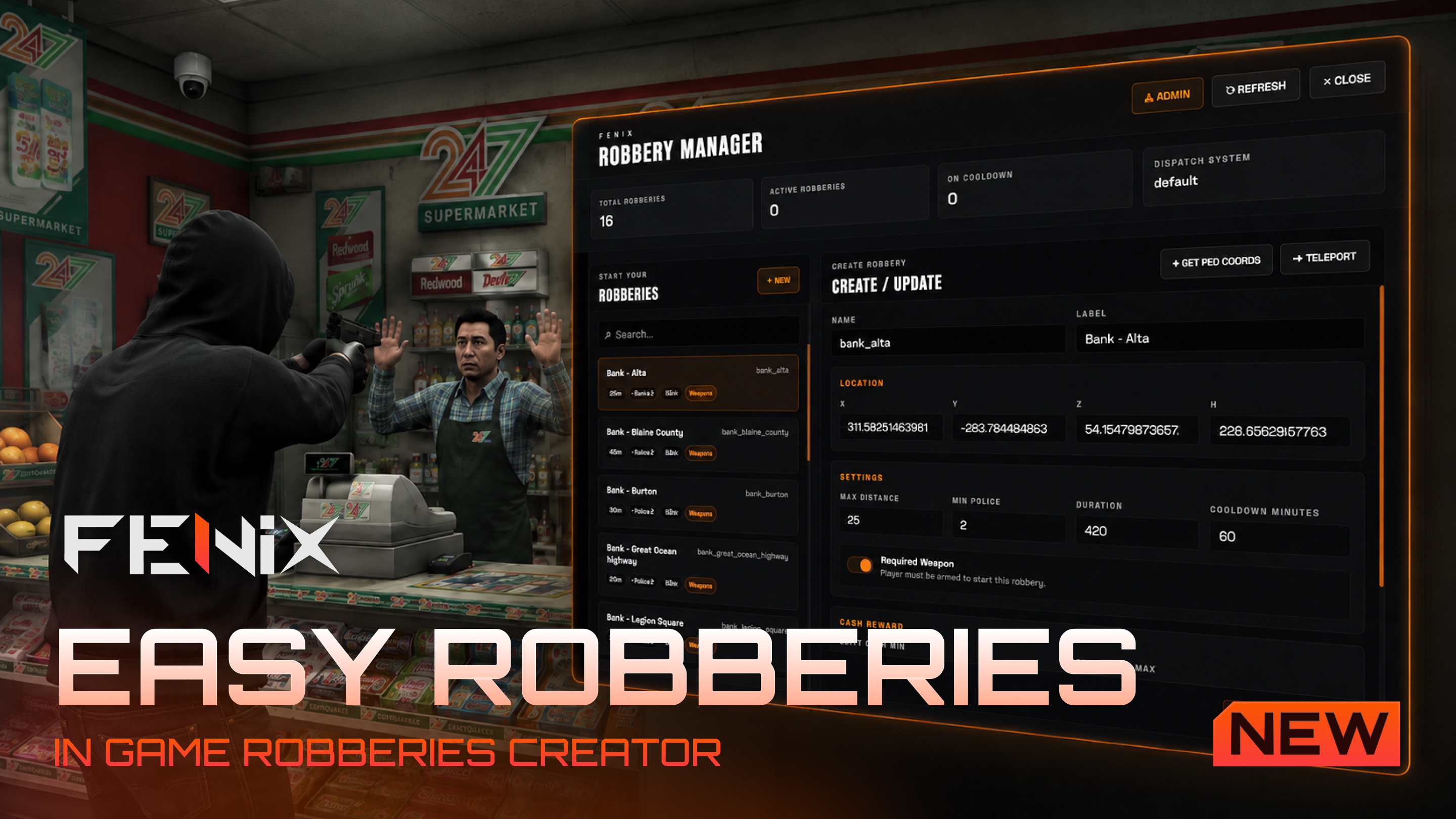
It allows server owners to create simple robbery points such as shops, banks and custom robbery spots directly in-game through a premium manager UI.
***
## Dependencies
FNX Easy Robberies requires:
1. [ox\_lib](https://github.com/overextended/ox_lib/releases)
2. [community\_bridge](https://github.com/TheOrderFivem/community_bridge/releases)
`community_bridge` must be started before `fnx-easy-robberies`.
***
## Installation
1. Download the resource from CFX PORTAL.
2. Extract the folder into your server resources folder.
3. Make sure the folder is named:
```text theme={null}
fnx-easy-robberies
```
4. Add this to your `server.cfg`:
```cfg theme={null}
ensure community_bridge
ensure ox_lib
ensure fnx-easy-robberies
```
5. Restart your server.
***
## Permissions
The robbery manager is available through the command:
```text theme={null}
/managerobberies
```
This command is intended for staff only.
Add the ACE permission in your `server.cfg`:
```cfg theme={null}
add_ace group.admin fnx.managerobberies allow
```
You can assign the permission to any group you want:
```cfg theme={null}
add_ace group.god fnx.managerobberies allow
add_ace group.admin fnx.managerobberies allow
add_ace group.mod fnx.managerobberies allow
```
***
## Commands
| Command | Description |
| ------------------ | ---------------------------- |
| `/managerobberies` | Opens the robbery manager UI |
***
## Configuration Files
The resource uses separated client and server configuration files.
```text theme={null}
settings/public/client/cfg.lua
settings/public/server/cfg.lua
```
### Client Config
The client config controls visual and client-side options such as:
* marker settings
* blip settings
* UI theme colors
* active robbery HUD
* dispatch alert visuals
* manager UI appearance
```text theme={null}
settings/public/client/cfg.lua
```
### Server Config
The server config controls secure server-side options such as:
* webhook URLs
* reward handling
* police job names
* staff permissions
* dirty money payout logic
* robbery validation
```text theme={null}
settings/public/server/cfg.lua
```
Do not move sensitive reward logic to the client side.
***
## Robbery Manager
The robbery manager allows staff to create and manage robberies directly in-game.
Open it with:
```text theme={null}
/managerobberies
```
From the UI you can:
* create a new robbery
* edit an existing robbery
* delete a robbery
* teleport to a robbery
* get your current ped coordinates
* configure police requirement
* configure rewards
* configure max distance
* configure cooldown
* enable or disable required weapon
* configure robbery duration
***
## Robbery Data
Robberies are saved inside:
```text theme={null}
robberies.json
```
Each robbery contains data similar to:
```json theme={null}
{
"store_strawberry": {
"label": "Strawberry Store",
"coords": {
"x": 28.2079,
"y": -1339.2318,
"z": 29.4970,
"w": 9.0292
},
"maxDistance": 15,
"minPolice": 0,
"requiredWeapon": true,
"duration": 120,
"cooldownMinutes": 60,
"dirtyMoney": {
"min": 5000,
"max": 15000
},
"itemPayout": [
{
"item": "gold_bar",
"amount": 1
}
]
}
}
```
Default robberies are included inside `robberies.json`.
***
## Default Robberies
The resource includes default locations for:
* shops
* banks
* ETC
Default categories include:
| Type | Max Distance | Example Reward |
| ----- | -----------: | ----------------------- |
| Shops | 15 | configurable |
| Banks | 25 | dirty money |
| ETC | 35 | high dirty money payout |
You can edit or remove them from the manager UI.
***
## Required Weapon
Each robbery can require the player to be armed.
By default, `requiredWeapon` is enabled.
```json theme={null}
"requiredWeapon": true
```
When enabled, the player must have a weapon equipped to start the robbery.
This can be changed per robbery from the manager UI.
***
## Cooldown
Each robbery has an independent cooldown.
Default cooldown:
```text theme={null}
60 minutes
```
This means that after a robbery is completed, the same location cannot be robbed again until the cooldown expires.
Cooldown is configured per robbery from the UI:
```json theme={null}
"cooldownMinutes": 60
```
Cooldowns are stored server-side during runtime.
***
## Rewards
FNX Easy Robberies supports two reward types:
* dirty money
* items
### Dirty Money
Dirty money can be configured with minimum and maximum values:
```json theme={null}
"dirtyMoney": {
"min": 100000,
"max": 250000
}
```
If no dirty money reward is needed, it can be set to `null`.
```json theme={null}
"dirtyMoney": null
```
### Item Rewards
Multiple item rewards can be added from the UI.
Example:
```json theme={null}
"itemPayout": [
{
"item": "gold_bar",
"amount": 2
},
{
"item": "diamond",
"amount": 1
}
]
```
If no item payout is needed, it can be set to `null` or left empty.
***
## Dirty Money Handling
Dirty money handling is configured server-side in:
```text theme={null}
settings/public/server/cfg.lua
```
The system supports different framework standards.
Common examples:
| Framework | Common Dirty Money Type |
| --------- | ----------------------- |
| ESX | `black_money` account |
| QBCore | `markedbills` item |
| Qbox | `black_money` item |
The payout logic is handled server-side to avoid client-side reward exploits.
***
## Dispatch Integration
FNX Easy Robberies uses the **Community Bridge Dispatch module**.
The resource automatically checks the active dispatch system configured in Community Bridge and sends a robbery alert when a robbery starts.
Dispatch settings are available in:
```text theme={null}
settings/public/client/cfg.lua
```
Example configuration:
```lua theme={null}
ClientCfg.Dispatch = {
enabled = true,
code = '10-90',
icon = 'fas fa-mask',
time = 10000,
jobs = {
'police',
'sheriff'
}
}
```
The dispatch alert includes:
* robbery location
* robbery label
* alert code
* police jobs
* blip data
The dispatch system is handled through Community Bridge, so you do not need to manually integrate different dispatch scripts inside this resource.
***
## Discord Logs
FNX Easy Robberies supports separate Discord webhook logs.
There are two main webhook types:
### Staff Webhook
Used for staff/admin actions:
* robbery created
* robbery edited
* robbery deleted
* staff teleported to robbery
### Robbery Webhook
Used for player robbery events:
* robbery started
* robbery cancelled
* robbery completed
* payout granted
* security warnings
Configure webhooks in:
```text theme={null}
settings/public/server/cfg.lua
```
Example:
```lua theme={null}
ServerCfg.Logs = {
enabled = true,
staffWebhook = 'YOUR_STAFF_WEBHOOK',
robberyWebhook = 'YOUR_ROBBERY_WEBHOOK',
webhook = ''
}
```
Do not share your webhook publicly.
***
## Blips
Blips are configured client-side.
The blip label is fully localized and uses the translation key:
```text theme={null}
robberies.ui.blipLabel
```
Example English label:
```text theme={null}
Robbery
```
You can configure:
* sprite
* color
* scale
* visibility
* short range
in:
```text theme={null}
settings/public/client/cfg.lua
```
***
## Markers
Robbery markers use `ox_lib` points.
The marker settings can be changed in:
```text theme={null}
settings/public/client/cfg.lua
```
You can configure:
* marker type
* size
* color
* draw distance
* interaction distance
***
## Active Robbery HUD
When a player starts a robbery, a small HUD appears on the screen.
The HUD shows:
* robbery name
* remaining time
* status
The active robbery HUD is intentionally small and discreet to avoid blocking gameplay.
The active robbery HUD is shown only to the player currently performing the robbery.
***
## Localization
All text is handled through the `locales` folder.
```text theme={null}
locales/*.json
```
This includes:
* notifications
* errors
* UI labels
* buttons
* manager text
* blip label
* dispatch messages
* webhook text
There is one single place to translate the resource: the locale JSON files.
***
## Supported Languages
The resource includes locale files for the Fenix standard supported languages:
```text theme={null}
af, ar, bg, cs, da, de, el, en, en-pirate, es, fi, fr, hi, hr, hu, it,
ja, ko, lt, nl, no, pl, pt, ro, ru, sv, th, tr, zh, zh-cn, zh-hk, zh-tw
```
***
## UI Theme
The manager UI and active robbery HUD colors can be customized from:
```text theme={null}
settings/public/client/cfg.lua
```
Example:
```lua theme={null}
ClientCfg.UiTheme = {
accent = '#f97316',
accentHover = '#fb923c',
accentSoft = 'rgba(249,115,22,.10)',
backgroundOverlay = 'rgba(0,0,0,.36)',
text = '#f5f5f5',
muted = 'rgba(255,255,255,.56)'
}
```
This allows you to create different visual themes without editing the React UI source.
***
## Security
The resource validates important actions server-side.
Server-side validation includes:
* robbery existence
* player distance from robbery
* active cooldown
* required weapon check
* police count
* reward payout
* invalid request protection
Never trust client-side reward data. Rewards are calculated and granted server-side.
***
## Troubleshooting
### The manager command does not open
Make sure you have the ACE permission:
```cfg theme={null}
add_ace group.admin fnx.managerobberies allow
```
Also make sure you are in the correct group.
***
### The robbery does not start
Check:
* minimum police requirement
* robbery cooldown
* required weapon setting
* player distance from the robbery point
***
### Dirty money is not being paid
Check your framework dirty money system.
Common standards:
| Framework | Type |
| --------- | --------------------- |
| ESX | `black_money` account |
| QBCore | `markedbills` item |
| Qbox | `black_money` item |
Also check the payout function in:
```text theme={null}
settings/public/server/cfg.lua
```
***
### Dispatch alert is not sent
Check that dispatch is correctly configured inside `community_bridge`.
Also make sure:
```lua theme={null}
ClientCfg.Dispatch.enabled = true
```
***
### Blip name is not translated
Check the locale key:
```text theme={null}
robberies.ui.blipLabel
```
inside your selected language file.
***
### UI text is still in English
Make sure the selected language is supported by Community Bridge and that the matching file exists in:
```text theme={null}
locales/
```
***
## Support
Need help?
Join our Discord server:
```text theme={null}
https://discord.gg/7d6YbQQVms
```
You can also check more Fenix Studios resources on:
```text theme={null}
https://fenixstudios.net
```
***